
Reduce WhatsApp Messaging Costs by Checking Numbers First
Where WhatsApp outreach budget leaks, and how a registration check before each send keeps unregistered numbers out of your paid campaigns.
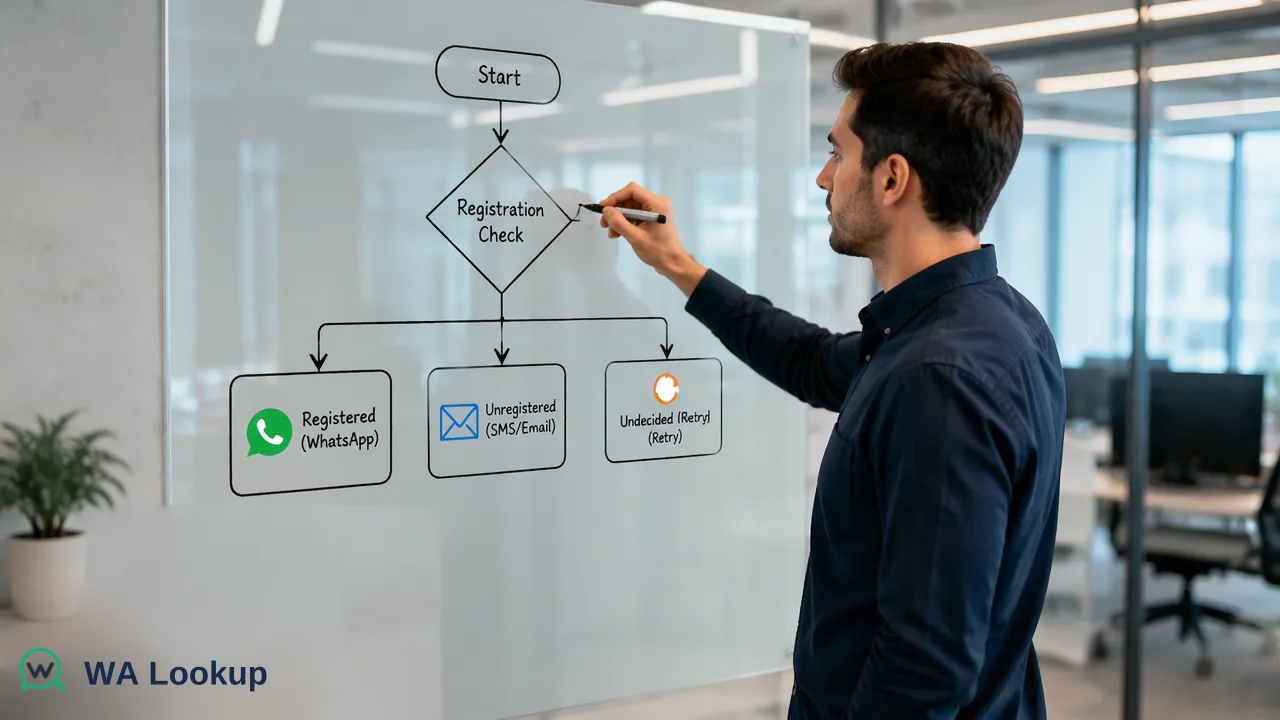
A practical look at how checking numbers before a WhatsApp send removes wasted spend on unregistered contacts.
The most direct way to reduce WhatsApp messaging costs is to stop sending to numbers that have no WhatsApp account. A registration check run before the send tells you whether a number had an account at check time, so unregistered numbers can be routed to another channel or removed instead of being paid for. It removes one avoidable source of waste: sends that could never have reached a WhatsApp inbox.
Where WhatsApp outreach spend actually leaks
Teams usually look at the per-message rate first, but the larger leak is often the list. Lists collected over years from web forms, trade shows, purchased files and CRM imports contain typos, landline numbers, old numbers and people who simply never used WhatsApp. Every one of those rows still enters the send queue.
The cost shows up in several places:
- Wasted sends. Messaging platforms and business solution providers commonly bill or consume credits for attempted sends, and published guidance from messaging vendors notes that failed sends can still cost credits depending on the platform.
- Distorted reporting. Unreachable rows lower delivery and reply rates, so campaign comparisons become unreliable and budget decisions follow bad numbers.
- Account quality. WhatsApp's business messaging policy expects businesses to message people who have opted in and who want to hear from them. A list full of numbers that do not exist or never consented is a poor foundation for any program.
- Staff time. Agents who follow up on dead contacts spend effort that a pre-send check removes at the start.
What a registration check does and does not tell you
A completed WhatsApp registration check reports whether a number had a WhatsApp account at the moment of the check. That is an account-presence signal.
WA Lookup returns this as a completed result for the number you submit, and both outcomes are final answers: registered and not registered. Treat an undecided check as a reason to retry later, never as a confirmed unregistered number, otherwise you may drop contacts who were reachable.
Because completed checks, whether the number turns out registered or unregistered, are charged, the saving comes from comparing the cost of checking against the cost of sending to rows that would have failed. Review the current pricing page for how balance and plans work, and run the arithmetic against your own message cost and your own share of unreachable rows.
A pre-send workflow that removes waste
A simple sequence fits most outreach programs:
- Normalize first. Convert numbers to international format with the country code. Malformed rows waste a check and tell you nothing useful.
- Deduplicate. The same person often appears several times with different formatting. Checking duplicates only adds cost.
- Pick the right check. Use the registration check when you only need to know whether an account exists. Add avatar or business-account checks only if your segmentation uses them.
- Choose realtime or bulk. Single and small multi checks return in the same response, which suits signup forms and CRM triggers. For a large file, an asynchronous bulk task is an upload-wait-download job.
- Route by result. Registered numbers go to the WhatsApp queue. Unregistered numbers go to email, SMS or a call, or are held for review. Undecided numbers are retried.
- Store the outcome and date. A registration signal is true at check time. Recheck old records before a large campaign instead of trusting a result from months ago.
For a list that is far larger than a realtime request handles comfortably, the asynchronous bulk services accept a TXT or CSV file, return a task you can poll, and provide a downloadable result file afterwards. Per-product limits apply, so check the API documentation before planning a large run.
Estimating whether the check is worth it
Use your own figures rather than industry averages. Three inputs are enough:
| Input | Where to find it |
|---|---|
| Rows in the list | CRM export count after deduplication |
| Share of rows without WhatsApp | Sample a few hundred rows with realtime checks first |
| Cost of one attempted send | Your provider invoice or billing dashboard |
If a sample shows that a meaningful slice of the list is unregistered, multiply that slice by your send cost and compare it with what the checks would cost. If the slice is tiny, a full check may not pay off and a sampled audit is enough. Running a small realtime sample before committing a whole list is the cheapest way to answer the question with evidence instead of estimates.
Keep consent and quality in the picture
Lower spend should not push a team toward messaging more people more aggressively. A registered number is still only a number: the person must have agreed to hear from you, and your messages must stay relevant. Keep opt-in records next to the check results, honor opt-outs, and use the saved budget on better templates and follow-up for contacts who actually engage. Checking numbers first helps the budget go further; it does not replace consent practices.
FAQ
Does checking a number before sending lower the price of each WhatsApp message?
No. Per-message charges are set by WhatsApp and your messaging provider. A pre-send check lowers total spend by keeping numbers without a WhatsApp account out of the send queue.
How should teams treat a number that returns an undecided result?
Treat it as unknown. An undecided check is not a registered-false result, so retry it later instead of removing the contact.
Are unregistered results free to check?
No. Completed checks are charged whether the number is registered or not. The pricing page explains how balance and plans apply.
How can teams decide whether a full-list check is worthwhile?
Run a small realtime sample, estimate the share of unregistered rows, and compare that share multiplied by the cost of a send against the cost of the checks.
Learn More
Choose the product information that fits the next step in your workflow.