
How to Remove Non-WhatsApp Numbers from a Contact List Without Losing the Audit Trail
Normalize contacts, check WhatsApp registration, separate decided results from undetermined rows, and retain a reviewable source list.
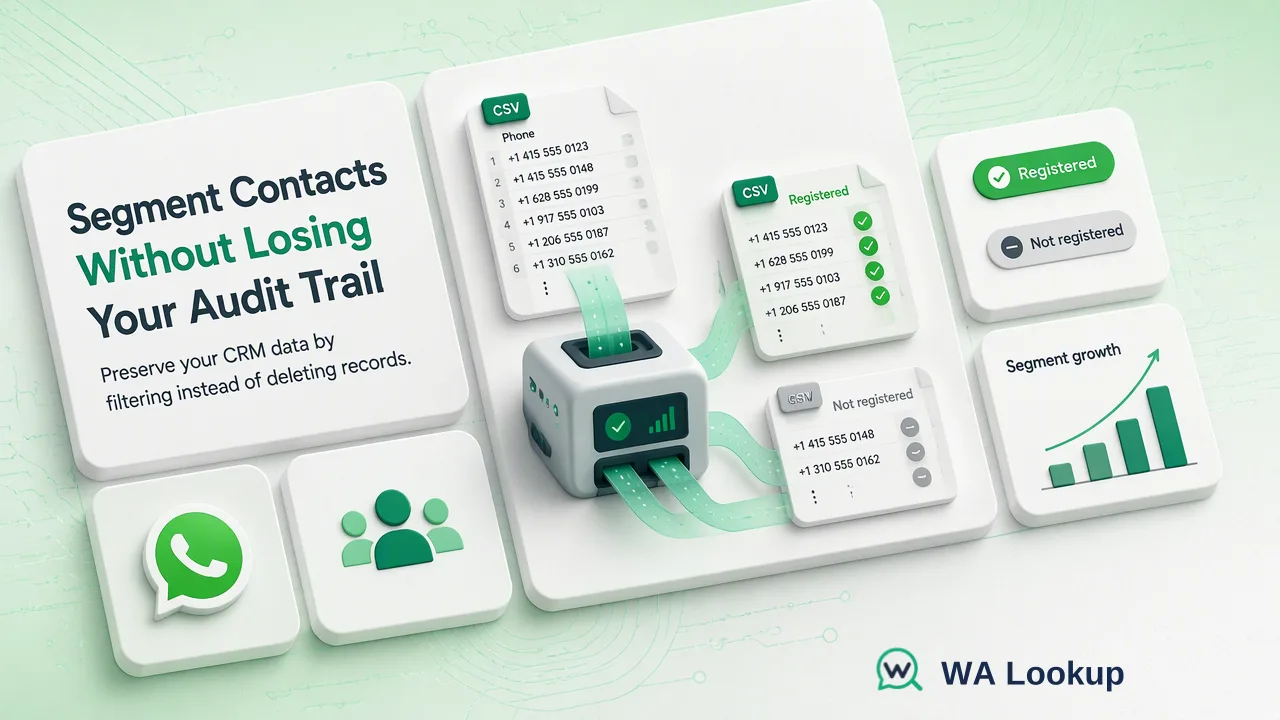
A stepwise method for segmenting a contact list by WhatsApp registration signal while retaining source records.
To remove non-WhatsApp numbers from a working contact list, first normalize the phone column and run a WhatsApp registration check on the resolved numbers. Move decided not-registered rows into a separate segment instead of deleting their source records, and keep undetermined rows for review. Record the check date because registration describes account presence at that moment, not a permanent attribute.
Prepare a working copy with traceable phone values
Export the contact list into a working table with a stable contact identifier, raw phone value, country context, and a blank check-status column. Keep the original list untouched. A team can then separate the list used for WhatsApp-oriented work from the master CRM record without losing a contact's other channels or history. The important design decision is to filter a segment, not erase a person because one platform check returned a particular result.
Normalize each phone number with its country calling code before checking it. Put a standardized number in a new text column; do not let spreadsheet software remove a leading plus sign, reformat long values, or replace missing digits. Resolve extensions, duplicates, and ambiguous local numbers in a review queue. If country context is missing, a guessed conversion may cause the wrong number to be checked. Keep the raw value beside the normalized value so a later correction is possible. The WA Lookup API documentation describes the accepted international-number input for checks; it is useful when setting the team's preparation rule.
Define the outcome categories before submitting anything: decided registered, decided not registered, undetermined or service error, invalid or unsubmitted input, and not yet checked. These categories should not collapse into a single yes-or-no column. An unsubmitted row has no registration result. An undecided check does not mean a number lacks an account. The separation also helps reviewers explain why the working segment changed after a later check.
Run registration checks at the scale of the list
For a small refresh, WA Lookup's WhatsApp Registration Check offers a realtime single-number path, and the dashboard Realtime Batch Check accepts pasted numbers. The REST API also has a synchronous multi-check path for application workflows. These checks return results in the initiating response. Use the mode that fits the team's existing process and preserve the mapping from each submitted value to its contact identifier. A quick pasted check may be appropriate for a small manual list; a CRM integration may use the API without turning a business procedure article into an implementation guide.
For a substantially larger list, the bulk registration product uses an asynchronous file task. Prepare an accepted TXT or CSV file with country-coded values and organize it around the selected country according to the current product rules. Submit the file, wait for processing, and download the result when it is available. This is a different lifecycle from a realtime response. Check the current documentation for the selected product's limits and precheck conditions before building the file. A rejected task or an excluded row should remain marked unprocessed rather than negative.
Before acting on the output, reconcile the number of submitted rows with the returned or downloaded result. If the source table had duplicates, multiple CRM contacts may map to one normalized number. Preserve that relationship explicitly rather than relying on row order. Check a sample of the join manually. A mismatch between input and result counts is a reason to inspect invalid, duplicate, or out-of-scope rows, not to fill empty cells with not registered.
Build a segment from decided results, not an irreversible deletion
For each completed registration result, record the normalized number, check date, and outcome in the CRM or working sheet. Put decided registered rows in the segment appropriate to the team's workflow. Put decided not-registered rows in a separate segment for other channel decisions or future review. Keep undetermined and error rows in a queue that can be investigated and rechecked under the team's own policy. Keep invalid input rows in a data-quality queue. These distinct destinations make later reconciliation possible.
A WhatsApp registration result is an account-presence signal at check time. It does not identify the person using the number, show consent for outreach, confirm message delivery, or predict a reply. If the business sends messages, its permission and messaging rules must be handled separately. The WhatsApp Business Messaging Policy addresses consent for business-initiated contact; a registration check does not replace that requirement. In practice, a registered segment is a list of records with a platform signal, not an approved send list.
When a contact has several numbers, segment each checked number independently and keep the contact-level record intact. A negative result for one phone value should not delete a second number, an email address, or the entire relationship. If the CRM supports only one phone field, preserve the detailed result in an audit table and store a simple status reference in the main record. That prevents the filtering process from discarding information needed by sales, support, or compliance reviewers.
Set a recheck and reconciliation routine
Record when the check took place and the version of the normalized number that was submitted. If a contact updates their phone field, the previous outcome should not be copied onto the new value. Lists that are used repeatedly need a recheck policy based on how often the underlying contacts change and how consequential a wrong segment would be. There is no universal interval that makes a past registration signal current forever. A team may prioritize fresh leads, recently edited numbers, or records near a planned campaign rather than refreshing every row on a fixed arbitrary date.
Review the queues separately. Fix malformed phone values using reliable country context. Investigate undecided checks without treating them as negative. Review the returned file or realtime output against the submitted list before moving records. Keep the original source record, corrected phone value, check outcome, and date so a later operator can understand why a record entered or left the working segment.
The operational goal is a reversible, explainable filter. The working list should contain numbers selected by a decided registration result, while the master list remains available for other lawful purposes and corrections. That design handles both the immediate need to avoid using a stale WhatsApp-oriented segment and the longer-term need to keep CRM history accurate. It also makes the next check easier: the team knows which rows changed, which are unresolved, and which were already decided at a recorded time.
FAQ
Should teams delete every contact whose number is not registered on WhatsApp?
No. Keep the source contact and put the decided not-registered phone value in a separate segment. The contact may have other valid channels or a corrected number later.
How should teams handle an undetermined WhatsApp check?
Keep it distinct from a decided not-registered result. Review the input and recheck according to an internal process; do not fill the missing result with a negative value.
Can teams use a spreadsheet for a large registration list?
Yes, as a source table. Export an accepted TXT or CSV file with country-coded numbers for the bulk workflow, then reconcile the downloaded result to stable contact identifiers.
Does registration mean the business can message the contact?
No. Registration is an account-presence signal at check time. Permission to contact and applicable messaging rules require separate handling.
Learn More
Choose the product information that fits the next step in your workflow.