
Product guidance
How to Perform a WhatsApp Registration Lookup
Learn how to perform a synchronous WhatsApp lookup to verify account presence. Explore single and batch registration checks using the WA Lookup API and dashboard.
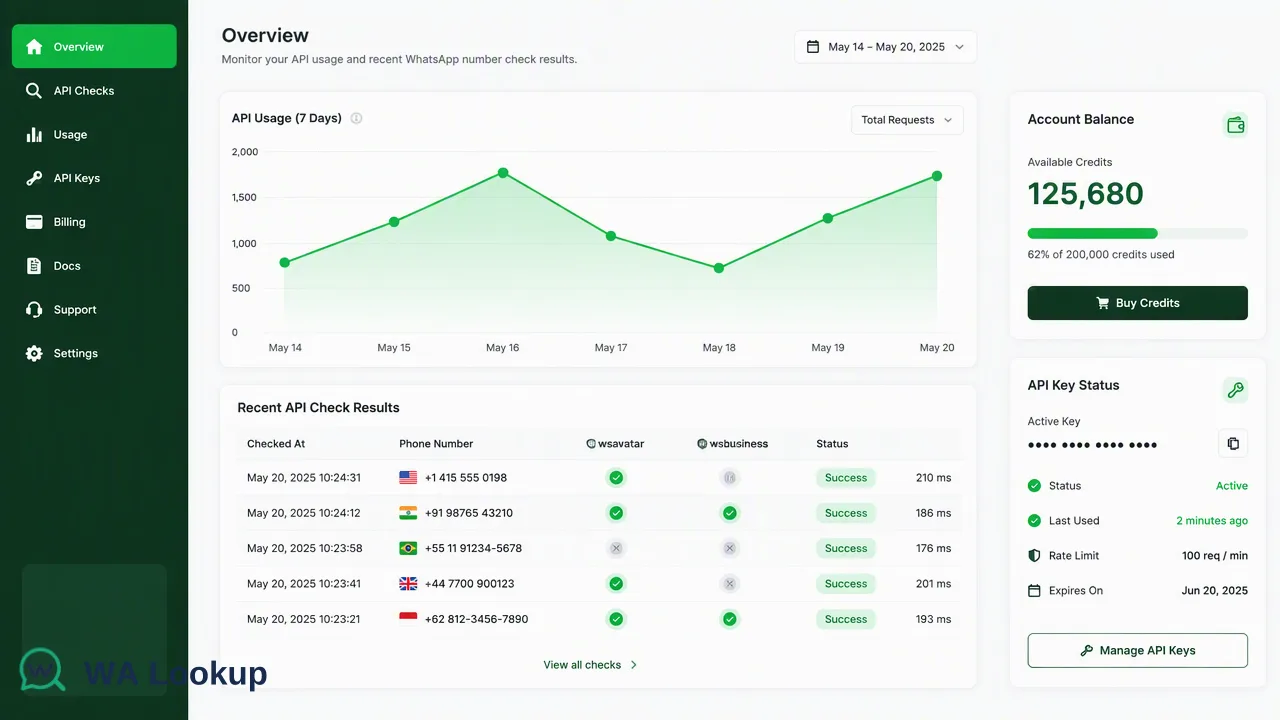
A practical guide for business and technical teams on performing synchronous WhatsApp registration checks using the WA Lookup platform, covering single-number and batch workflows.
A WhatsApp registration lookup is a synchronous check that confirms whether a specific phone number is currently associated with a WhatsApp account. By using the WA Lookup platform, organizations can retrieve real-time account-presence signals for single numbers or small batches. These checks provide immediate data to inform internal review workflows, helping teams segment audiences and prioritize outreach based on current platform registration.
Understanding WhatsApp Registration Signals
When organizations process contact lists, a WhatsApp registration signal provides a clear indicator of account presence at the exact time of the check. This signal confirms that a submitted E.164 phone number is registered on the platform. The WA Lookup platform returns this data synchronously, allowing teams to integrate the result directly into their operational workflows. It is important to scope this signal correctly within business processes. A registration result strictly reports account presence. By treating the signal as one input alongside other checks, teams can better organize their communication strategies without overestimating the reachability of a given contact.
Performing a Single-Number Lookup
Teams can verify individual phone numbers using the WA Lookup synchronous REST API. The documented request contract requires submitting a POST /api/v1/check request. This request must include an X-API-Key header for authentication and a JSON payload containing the target E.164 phone number and a service_type field.
Because the architecture is fully synchronous, the API returns the completed result in the initiating HTTP response. The outer response envelope for a completed check includes code, msg, and data. If a check cannot be decided, the API returns a non-zero business code rather than a completed result object.
Standard Registration Check
Using the ws service type returns the baseline returned data object. This includes the service_type, the identifier, and a boolean registered field indicating account presence.
Avatar Enrichment Check
Selecting the ws_avatar service type performs the standard registration check and adds avatar and avatar_url fields to the response. The avatar_url may return as an empty string depending on the account's configuration.
Business Profile Check
The ws_business service type checks for standard registration and adds a business boolean field to indicate if the account uses WhatsApp Business.
Processing Batch Lookups
For workflows requiring higher throughput, WA Lookup supports a synchronous batch endpoint. Organizations can submit up to 100 identifiers in a single request. This capability is designed for efficiency while maintaining the same real-time response model as the single-number check. The batch endpoint processes the submitted E.164 numbers and returns the entire result set in one response, or fails as a whole. This eliminates the need for complex asynchronous architectures. Teams do not need to implement task-submission queues, polling mechanisms, or callback webhooks to retrieve their data. The synchronous design ensures that the batch results are immediately available for downstream routing or segmentation.
Accessing Results via Dashboard or API
Organizations can interact with WA Lookup through a SaaS web dashboard or programmatically via the REST API. Both access methods share the same synchronous result semantics and underlying account balance. The web dashboard provides a visual interface for managing API keys, viewing account balance, and analyzing check history. Teams can access product-level reporting, review recent checks, monitor balance spend, and observe 7-day usage trends. For programmatic access, the API documentation outlines per-user concurrency and timeout controls. Billing operates on a pay-per-check model, where failed or undetermined checks are refunded automatically.
Integrating with MCP-Compatible AI Clients
In addition to standard REST API access, WA Lookup offers an official Model Context Protocol (MCP) Server. This server is reachable at the website's /mcp path over Streamable HTTP and JSON-RPC. It allows MCP-compatible AI clients, such as Claude Code or Claude Desktop, to interact directly with the checking tools.
The MCP integration uses the customer's existing API key and shares the exact same products, balance, concurrency limits, and billing as the REST API. It exposes specific tools to the AI assistant: listing available products, checking a single E.164 number, synchronously checking a small batch of up to 100 numbers, and querying the account balance. Like the standard API, MCP calls are real-time and synchronous, returning account-presence signals without creating asynchronous tasks or downloadable files.
FAQ
What does a 'registered' status mean?
A registered result indicates that the submitted E.164 phone number is associated with a WhatsApp account at the time of the check. It serves as an account-presence signal to inform internal workflows.
Can organizations check multiple numbers at once?
Yes, WA Lookup provides a synchronous batch endpoint that accepts up to 100 identifiers in a single request. The entire batch is processed and returned in the same HTTP response.
How can teams access account credit for testing?
New accounts can contact support to receive 100 free checks, which can be used to try the service and evaluate the synchronous API or dashboard features.
Are there per-minute request limits for the API?
The public API documentation describes per-user concurrency and timeout controls rather than a strict per-minute request-rate limit. Teams should consult the current API documentation for applicable behavior and concurrency guidelines.