
WhatsApp Checker API: Checking Registration from Your Backend
Call a WhatsApp checker API from server code: single and 100-number requests, picking the check type, and handling checks that cannot be decided.
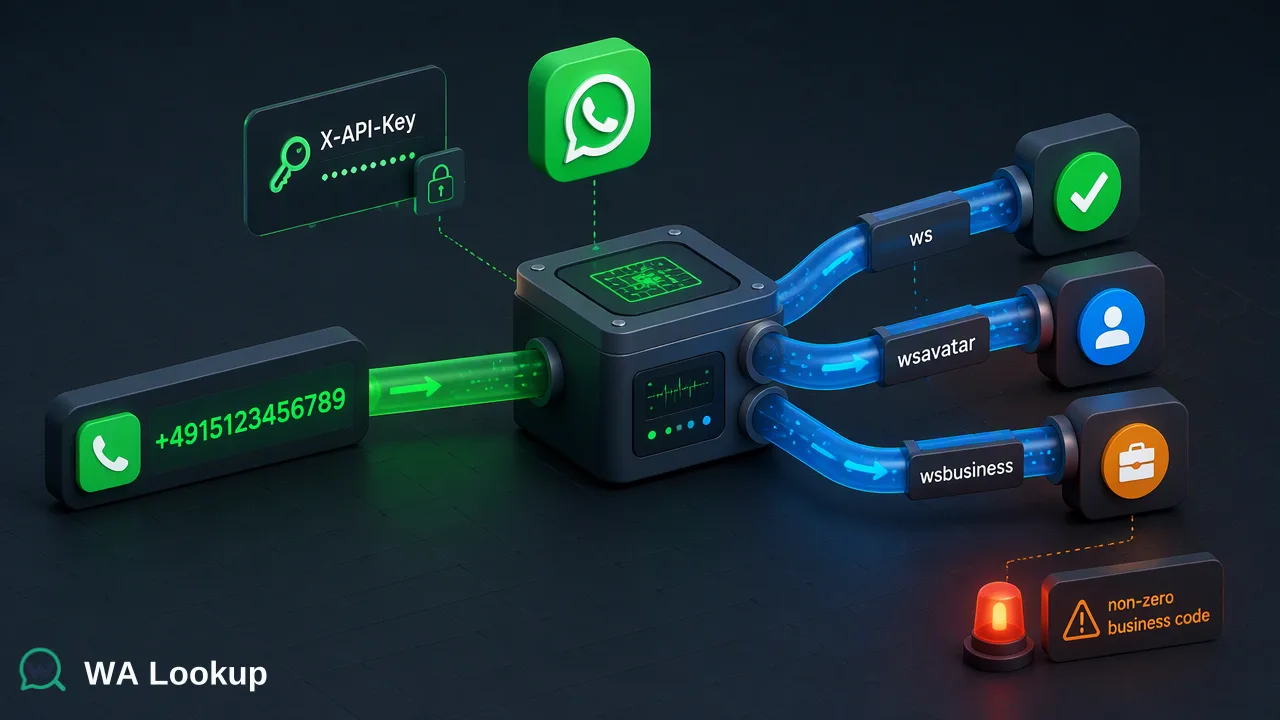
How backend teams call a WhatsApp checker API, choose between the registration, avatar and business-account checks, and handle undecided results.
A WhatsApp checker API takes a phone number from your server and returns, in the same response, whether a WhatsApp account was registered on that number at check time. In WA Lookup, one number goes to POST /api/v1/check with the key in the X-API-Key header and a service_type that picks the registration, avatar or business-account check, while POST /api/v1/batch-check accepts up to 100 numbers in one synchronous request. A check that cannot be decided returns a non-zero business code, which backend code should treat as "try again later" rather than as a not-registered answer.
What a WhatsApp checker API gives a backend
Search results for this query are mostly marketplace listings and API wrappers that show a phone parameter and a true or false answer. Several of them run checks through a connected WhatsApp session, so the API stops answering when that phone goes offline. Few explain what the answer means for the code that consumes it, or how to handle the cases where no answer is possible.
For backend work, the useful mental model is simple. A WhatsApp checker API answers one question per number: was a WhatsApp account registered on this number when the check ran? That is an account-presence signal for one platform. It is a good input for:
- choosing whether WhatsApp is worth trying for a contact before another channel;
- cleaning a phone field in a CRM or lead database;
- adding context to a signup or onboarding review queue.
It is not a statement about who holds the number or whether they agreed to be contacted. Keep your consent records and contact history as separate inputs, and store the date of each check so the value can be refreshed later.
| Approach | How checks run | What your team maintains |
|---|---|---|
| Session-based provider API | Through a WhatsApp number connected to the provider | A phone or session that must stay online |
| Self-hosted script | Automates a personal WhatsApp Web session | Script updates, session health, account-restriction exposure |
| Hosted checker API (WA Lookup) | Your server calls an HTTPS endpoint with an API key | Key storage, retries, result storage |
How to call the WhatsApp checker API for a single number
The single-number call is one HTTPS request with one response. There is no job to create, nothing to poll and no callback URL to expose.
- Normalize to E.164. Send the number with a plus sign, the country calling code and the national number, following the ITU-T E.164 numbering plan. Strip spaces, brackets and national trunk prefixes. A German mobile number written locally as 0151 2345 6789 becomes +4915123456789. Google's libphonenumber parses raw input with a default region and is safer than hand-written string rules.
- Pick the check. Set
service_typetows,ws_avatarorws_businessdepending on the decision the result will drive. - Authenticate from the server. Send the key in the
X-API-Keyheader. Load it from a secret store or environment configuration, and never place it in browser code, a mobile app bundle or a public repository. - Send
POST /api/v1/check. The result for that number arrives in the response to the same request. - Branch on the outcome. A completed result carries the answer for the selected check. A non-zero business code means the check could not be decided for now.
Build the request body and response parsing from the current WA Lookup API documentation. Payloads from other providers' examples differ, and copying them is a common source of integration bugs.
Choosing the check type: ws, ws_avatar or ws_business
The value of service_type decides which signal comes back. Choose the narrowest check that answers the question your code is asking, because each completed check is charged whether the answer is registered or not registered.
ws
The registration check. It tells the backend whether the submitted number had a registered WhatsApp account at check time. This is the default for channel decisions, list cleaning and signup review.
ws_avatar
The avatar check. Alongside registration, it reports whether a profile photo is available and, where one is, a link to it. The link can be an empty string. Use it for contact-record enrichment or to give a human reviewer more context. A missing photo says nothing about whether the number is registered.
ws_business
The business-account check. Alongside registration, it reports whether the account is a WhatsApp Business account, the account type created with the WhatsApp Business app or business platform. Sales teams use it to separate business accounts from standard ones. It describes account type only and is not a check on a legal company.
| Question your code needs answered | Check |
|---|---|
| Should WhatsApp be tried for this contact? | ws |
| Does the contact record need avatar availability? | ws_avatar |
| Is this a business account or a standard account? | ws_business |
Checking up to 100 numbers with the batch-check endpoint
When a backend already holds a group of numbers, such as a nightly import or a form submission with several contacts, POST /api/v1/batch-check sends up to 100 numbers in one synchronous request. The whole batch comes back in the response to that request, or the request fails as a whole.
That behaviour shapes the client code:
- Chunk larger lists. Split input into groups of 100 or fewer and send them one after another or with a small, controlled number in flight.
- Treat a failed request as a unit. If the batch request itself fails, retry that chunk; do not mark its numbers with any result.
- Still read per-number outcomes. Inside a successful batch, each number has its own completed or undecided outcome, so the branching logic from the single-number flow applies to every entry.
- Deduplicate first. Normalizing before chunking often reveals duplicates written in different local formats; checking each number once keeps spending predictable.
The batch endpoint is still a same-response flow. It is the right tool for tens or a few hundred numbers handled by application code, not for a file with a very large list.
Handling undecided checks and request errors
The most expensive integration mistake is writing "not registered" into a database when the check never reached a decision. A completed not-registered result is a real answer. A non-zero business code is not an answer at all.
A practical branching pattern:
| Outcome | What the backend should store | Next step |
|---|---|---|
| Completed, registered | The selected check, the result, the check date | Use as a workflow input |
| Completed, not registered | The same fields | Try another channel or leave for a later re-check |
| Non-zero business code | Nothing in the result field; log the code and time | Queue a retry with backoff |
| Transport error or timeout | Nothing in the result field | Retry the request; alert if failures persist |
Use exponential backoff for retries and cap the number of attempts, so a temporary problem does not turn into a burst of repeat calls. Keep the undecided numbers in a separate state such as "pending re-check", which lets reports distinguish them from decided outcomes.
Running the integration in production
A few operating habits make a checker integration easier to support:
- Respect the documented controls. The current API documentation describes per-user concurrency and timeout controls. Size the number of requests in flight to those controls and read the documentation again when scaling up, instead of assuming a fixed per-minute allowance.
- Watch the account balance. One account balance covers the dashboard, the REST API and the MCP server, so a large API job and manual dashboard checks draw from the same pool. Check the balance in the dashboard before a large run.
- Log without leaking. Log request outcomes and error codes, but mask phone numbers in general application logs and never log the API key.
- Rotate keys. The dashboard manages API keys; rotate a key if it may have been exposed and update the secret store in one step.
- Record context. Store which check ran and when. A result from months ago describes the number at that time, not today.
WhatsApp's own Terms of Service restrict automated or unauthorized access to its services, which is one reason teams move away from scripts that drive a personal session and toward a hosted API with its own key.
When a file task fits better than the API
For a very large list, an async bulk task is the better fit: upload a TXT or CSV file with one number per line, wait for processing, then download a result.csv. Bulk tasks use POST /api/v1/bulk-tasks to submit and GET /api/v1/bulk-tasks/{id} to follow progress, and per-product limits apply as described in the API documentation. The file should contain numbers from essentially one country, and the bulk services do not cover mainland China, Hong Kong or Macau numbers. Bulk balance is reserved at submission, with the unused part returned after processing.
For most backend features that react to a user action or a small import, the synchronous single and batch-check calls remain the simpler choice.
FAQ
How can teams test a WhatsApp checker API before wiring it into production?
Start with a handful of numbers whose expected outcome the team already knows, such as company phones, and call the single-number endpoint from a staging environment. Eligible new accounts automatically receive 100 free checks once after registration, which is usually enough to exercise the registered, not-registered and retry paths in client code.
What should a backend do when a number comes back undecided?
Leave the result field empty, record the business code and time, and place the number in a retry queue with backoff. Writing a not-registered value for an undecided check corrupts list data and leads to wrong channel decisions later.
Does the batch-check endpoint work differently from a file upload?
Yes. The batch-check endpoint returns up to 100 results in the response to the same request. A file upload creates an async bulk task that is processed in the background, after which a result.csv is downloaded.
Which check type should a CRM integration use by default?
The registration check, ws, covers most channel and data-quality decisions. Add ws_avatar or ws_business only when a field in the CRM actually uses avatar availability or account type, since each completed check is charged.
Learn More
Choose the product information that fits the next step in your workflow.