
How to Know If a Phone Number Has WhatsApp
Compare the in-app, wa.me link and registration-check methods, read results correctly, and pick the right option for one number or a whole list.
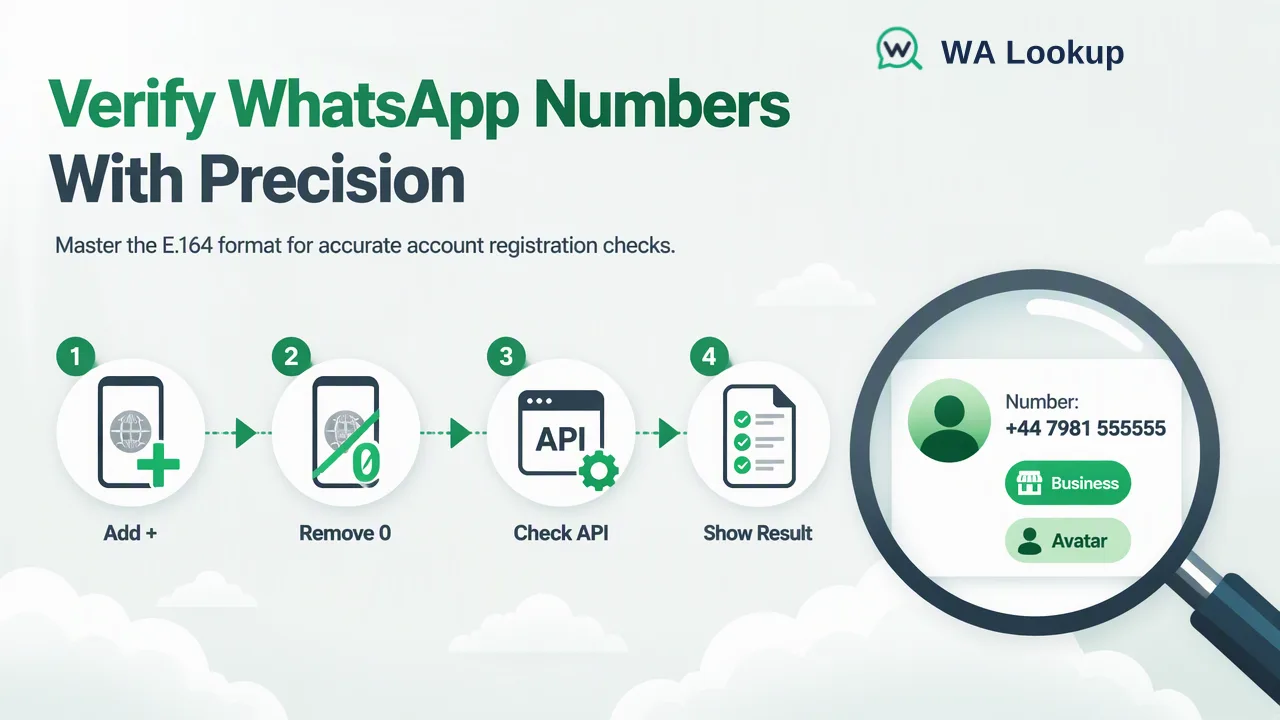
A practical guide to finding out whether a phone number has a WhatsApp account, from the in-app method to a realtime registration check, and how to read the result.
The most reliable way to know if a number has WhatsApp is to run a registration check on the full, country-coded number rather than saving it as a contact and waiting to see what the app shows. A registration check returns whether the number has a WhatsApp account at the moment of the check, without touching your own phone or address book. For one number, the in-app "New contact" screen or a wa.me link can work; for anything you need to record, repeat, or scale, a dedicated check gives a clear, stored answer.
Three ways to know if a number has WhatsApp
Most guides in the search results stop at "save the contact and look". That works for a friend's number, but it is not the only method, and each one has different side effects.
| Method | How it works | Good for | Drawbacks |
|---|---|---|---|
| WhatsApp "New contact" screen | Type the number in the app's add-contact flow; the app indicates whether the number is on WhatsApp | One personal contact | Uses your personal account, adds entries to your address book, and repeated lookups can be paused by the app |
| wa.me click-to-chat link | Open https://wa.me/<number> in a browser; an unregistered number shows a "not on WhatsApp" message |
Quick one-off look without saving the contact | Manual, one number at a time, no record of when you checked |
| Registration check service | Submit the country-coded number to a checker such as WA Lookup and read the result | Business lists, CRM records, repeated checks | Requires an account; decided results are billed per check |
WhatsApp documents the add-contact flow in its How to add a contact article and the link format in How to use click to chat. Both are designed for people starting a conversation, not for answering the question across many records. When the answer needs to live in a spreadsheet or CRM with a date next to it, a registration check is the cleaner choice.
Step 1: Write the number in full international format
Every method above depends on the number being complete. WhatsApp's guide About international phone number format describes the rules that also apply to a registration check:
- Start with the plus sign and country code. A UK mobile written locally as 07981 555555 becomes +447981555555.
- Drop the national trunk prefix. The leading 0 used for domestic dialling is removed after the country code.
- Remove spaces, brackets, dashes and dots. Keep only the plus sign and digits.
- Apply country-specific rules. WhatsApp notes that Argentine mobile numbers need a 9 between the country code (54) and the area code, and that Mexican numbers have their own prefix rule; check the help article before formatting those lists.
This country-coded layout is often called E.164. A large share of "this number is not on WhatsApp" surprises come from numbers that were stored without a country code or with a leftover trunk zero, so it is worth fixing the format before drawing any conclusion.
Step 2: Run a realtime single-number check in WA Lookup
In the WA Lookup dashboard, a single-number check returns its answer in the same session, with no file upload or waiting step:
- Sign in and open the realtime check area of the dashboard.
- Choose the check that matches the question. The WhatsApp Registration Check answers "does this number have an account?"; the WhatsApp Avatar Check adds whether a profile image is visible; the WhatsApp Business Account Check adds whether the account is a business account.
- Enter one number in international format and submit it.
- Read the result and, if you keep records, copy it into the contact record together with today's date.
Eligible new accounts automatically receive 100 free checks once after registration, which is enough to test the workflow on real numbers before deciding how to use it in a team process. The dashboard also shows the account balance and validation history, so a colleague can see what was checked and when.
Realtime single checks also cover mainland China (+86), Hong Kong (+852) and Macau (+853) numbers for small volumes, which is useful when a list contains a handful of contacts from those regions.
What the result tells you, and what it does not
A completed check gives one of two decided answers:
- Registered: the number had a WhatsApp account when it was checked. This is an account-presence signal on one platform. It does not tell you who owns the number, whether that person agreed to be contacted, or whether a message will get a reply.
- Not registered: the number had no WhatsApp account at check time. Keep the contact for other channels rather than deleting it; people sign up for WhatsApp, change numbers and move between countries.
There is a third situation that is easy to misread. Sometimes a check cannot be decided, and the service returns an error response instead of an answer. That is not the same as "not registered". Leave those rows marked as undetermined and check them again later instead of treating them as numbers without WhatsApp.
Both decided answers, registered and not registered, are billed as completed checks. An undetermined response is not a completed result. Because every answer describes a moment in time, store the check date with the result and refresh older records before a new campaign.
When you have more than one number to check
The method should match the size of the list:
| List size | Option in WA Lookup | How results arrive |
|---|---|---|
| One number | Dashboard single check, or POST /api/v1/check |
In the same response |
| Up to 500 numbers pasted by hand | Dashboard Realtime Batch Check | In the same session |
| Up to 100 numbers per request from code | POST /api/v1/batch-check |
In the same response |
| Very large files | Async bulk file task via POST /api/v1/bulk-tasks |
Upload, wait for processing, then download a result file |
For developers, the realtime API authenticates with an X-API-Key header and uses the same account balance as the dashboard. For lists far beyond a pasted batch, a bulk file task accepts a TXT or CSV file with one country-coded number per line; the list should be essentially one country, and bulk tasks do not accept mainland China, Hong Kong or Macau numbers. Per-product limits apply, so check the current API documentation before planning a very large upload.
Common mistakes when checking if a number has WhatsApp
- Checking local-format numbers. A number without its country code may be read as belonging to a different country, or fail entirely.
- Using a personal phone for business lists. Saving hundreds of prospects into your own address book mixes work data with personal contacts and can trigger pauses in the app.
- Treating "registered" as consent. A registration result tells you which channel is available, not whether outreach is welcome. Messaging rules and opt-in requirements still apply.
- Deleting every not-registered row. Those contacts may still be reachable by email, SMS or phone, and they may join WhatsApp later.
- Counting undetermined rows as negatives. Re-check them instead of moving them into the not-registered segment.
- Never refreshing results. A check from six months ago describes six months ago. Record the date and re-check before important sends.
FAQ
Can teams know if a number has WhatsApp without saving the contact?
Yes. A wa.me link opened in a browser shows whether a single number is on WhatsApp without adding it to the address book, and a registration check service such as WA Lookup returns the answer without involving any personal phone or contact list.
Does a registered result mean the person will see the message?
No. It shows that the number had a WhatsApp account at check time. Whether a message is delivered, read or answered depends on the recipient, their settings and your messaging practices.
Why does a number with WhatsApp show as not registered?
The most common cause is formatting: a missing country code, a leftover trunk zero, or extra characters. Rewrite the number in full international format and check again. If the result is still not registered, the number did not have an account at that moment.
How should a team handle a check that returns no answer?
Mark the row as undetermined, keep it out of both the registered and not-registered segments, and re-check it later. An undetermined response is not a decided result and should not be used to remove a contact.
Learn More
Choose the product information that fits the next step in your workflow.