
Product guidance
How to Plan a Bulk Phone Verification API Workflow
Learn how to plan a bulk phone verification API workflow using synchronous batch checks, E.164 formatting, and platform registration signals.
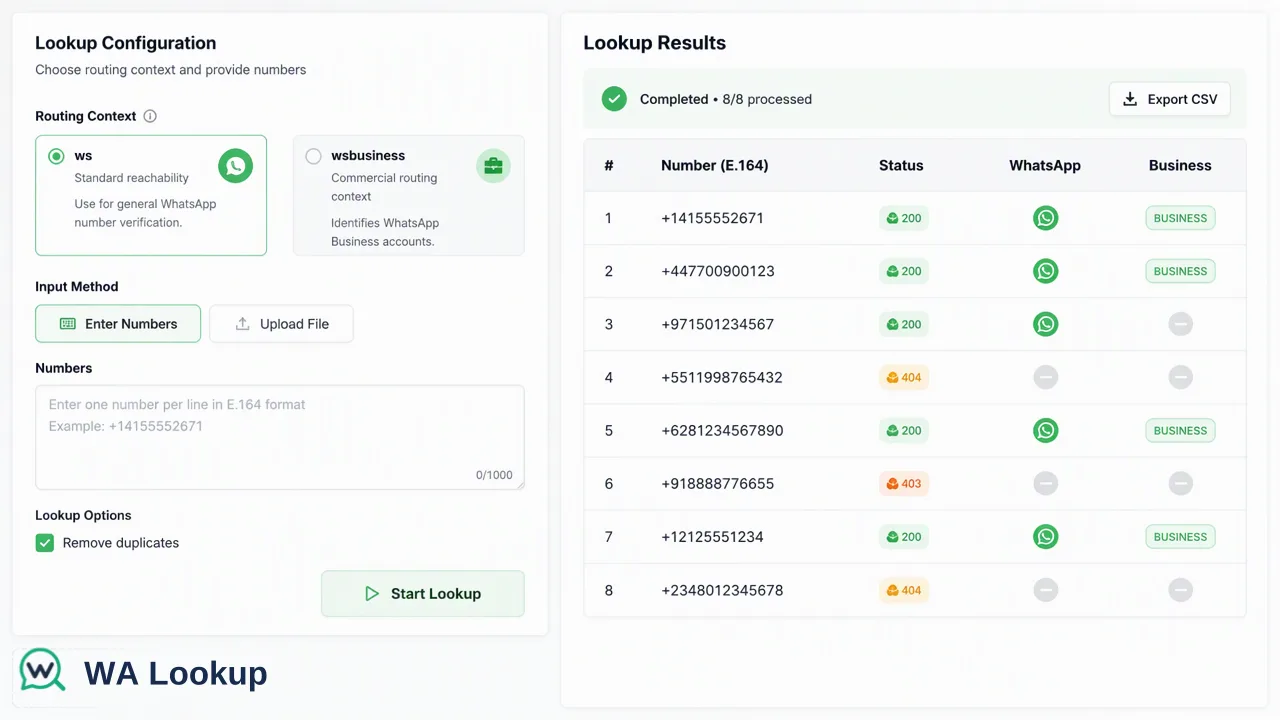
A technical guide to planning a bulk phone verification API workflow using synchronous batch endpoints, E.164 formatting, and WhatsApp account-presence signals.
Planning an efficient bulk phone verification API workflow requires structuring client requests around synchronous batch endpoints, enforcing E.164 number formatting, and properly parsing account-presence signals. With WA Lookup, systems submit up to 100 identifiers in a single synchronous HTTP request, receiving verification outputs directly within the initiating response. Because requests execute synchronously without task polling, webhooks, or background queue delays, client applications must handle concurrency, timeouts, and batch-level success or failure in real time to inform downstream routing and customer segmentation.
Understanding the Synchronous Batch Architecture
Architecting an automated verification pipeline begins with recognizing how data moves between your internal services and the verification endpoint. Many enterprise systems anticipate asynchronous batch processing involving background worker queues, status polling, or webhook listeners. In contrast, WA Lookup implements a synchronous request-response model for both single checks and batch operations. Under this model, your client application initiates an HTTP POST request and receives the completed verification data directly within the response body. The batch endpoint accepts up to 100 phone numbers in a single payload. Processing occurs in-flight, returning results for the entire collection or failing the batch as a whole. This eliminates the operational overhead of tracking job IDs, storing temporary job states in a database, or managing webhook listener infrastructure. Because responses return synchronously, engineering teams must configure their application HTTP clients appropriately. Request timeout settings should accommodate the time required to evaluate up to 100 identifiers. Rather than implementing rate-limiting tiers based on arbitrary per-minute quotas, teams should design client-side connection pools around documented per-user concurrency controls and timeout policies detailed in the official API documentation.
Preparing and Normalizing Phone Numbers
A resilient verification pipeline requires strict client-side data hygiene before records reach the network layer. The verification API requires every submitted phone number to follow the international E.164 standard. Submitting unformatted, locally formatted, or malformed numbers leads to validation errors or undetermined outcomes. E.164 formatting standardizes telephone numbers into a single string containing a leading plus sign, the country calling code, and the national subscriber number without spaces, hyphens, parentheses, or prefixes such as trunk zeros. Client pipelines should execute normalization as an automated pre-processing step:
- Strip non-numeric characters such as punctuation, whitespace, and formatting symbols.
- Identify the intended country code based on country metadata or user input fields.
- Remove local prefixes, such as leading zeros commonly used in domestic dialing.
- Prepend the international country calling code and leading plus symbol.
- Validate string length against standard country specifications prior to batching.
Once normalized, partition your records into discrete batches containing no more than 100 identifiers per payload. Keeping batches bounded at or below this ceiling ensures compatibility with the batch endpoint contract.
Selecting the Appropriate Check Capability
Verification workflows serve distinct business functions, from operational contact-list cleansing to enriched sales routing. WA Lookup provides three distinct check capabilities through the service_type parameter, allowing teams to request only the data points necessary for their workflow:
| Service Type | Scope & Returned Account Signals | Key Application in Workflows |
|---|---|---|
ws |
Basic platform registration check returning registered status. |
High-throughput list cleansing and reachability verification. |
ws_avatar |
Platform registration check returning registered, avatar presence, and avatar_url. |
Lead enrichment, visual validation, and profile completion checks. |
ws_business |
Platform registration check returning registered and business account classification. |
Segmenting commercial business numbers from standard personal accounts. |
Selecting the right capability helps systems minimize payload processing overhead. For high-volume filtering where teams only need to know whether an identifier is registered on WhatsApp, the standard ws check provides an efficient reachability indicator. For CRM workflows prioritizing lead quality or commercial categorization, ws_business supplies valuable routing context by identifying whether the account operates as an official WhatsApp Business entity.
Handling API Responses and Error States
A robust integration requires deterministic parsing of response payloads and resilient error handling. Completed requests return a standard JSON envelope consisting of code, msg, and data fields. For completed checks, the data object contains service_type, identifier, and a boolean registered value. When parsing output objects, systems must handle state representations precisely:
- Successful Determinations: A completed check provides
registered: trueorregistered: false. When usingws_avatar, the response additionally includes theavatarboolean andavatar_url(which may be an empty string). When usingws_business, it includes thebusinessboolean. - Undetermined Outcomes: If an identifier cannot be conclusively decided at check time, the API returns a non-zero business code rather than a completed result object with null values. Client applications should inspect the top-level
codefield before attempting to parsedataproperties. - Billing and Refunds: Billing functions on a per-check basis. Whenever a check fails or results in an undetermined status, the platform automatically refunds the associated balance back to the account. Downstream services should rely exclusively on the documented public response fields.
Translating Account-Presence Signals into Business Logic
The final phase of a bulk verification workflow involves feeding verified records into internal routing, CRM systems, or communication dispatch engines. To maintain data integrity, teams must accurately interpret what a platform registration signal represents. It confirms that the identifier is registered on the platform. Organizations should use registration results as decision-support inputs alongside existing operational data. For example, marketing and support platforms can use reachability signals to route messages to WhatsApp for registered numbers while directing unregistered contacts to alternative communication channels such as SMS or email. Incorporating these verified signals helps teams optimize operational resources, reduce failed message dispatch attempts, and maintain organized contact repositories.
FAQ
Does the bulk verification API support asynchronous queues or webhooks?
No. The verification API operates on a synchronous request-response architecture. Every request—whether checking a single identifier or a batch of up to 100 numbers—returns its complete result in the initiating HTTP response. It does not use task-submission tokens, polling loops, webhook callbacks, or downloadable file exports.
What happens if an identifier in a batch cannot be processed?
The synchronous batch endpoint processes submissions as an atomic unit: it returns the whole batch or fails as a whole. When individual checks cannot be decided, the API returns a non-zero business code rather than an incomplete result object, and undetermined or failed checks are automatically refunded.
Can systems use the same credentials for single-number and batch checks?
Yes. Client systems authenticate both single-number requests and batch requests using the same X-API-Key header. Shared account balances, concurrency controls, and reporting dashboards apply across all verification methods.
Learn More
Choose the product information that fits the next step in your workflow.