
Product guidance
Optimizing B2B Lead Validation with a WhatsApp Number Validation API
Integrate a synchronous WhatsApp number validation API into B2B workflows to verify account presence, format E.164 numbers, and segment business leads.
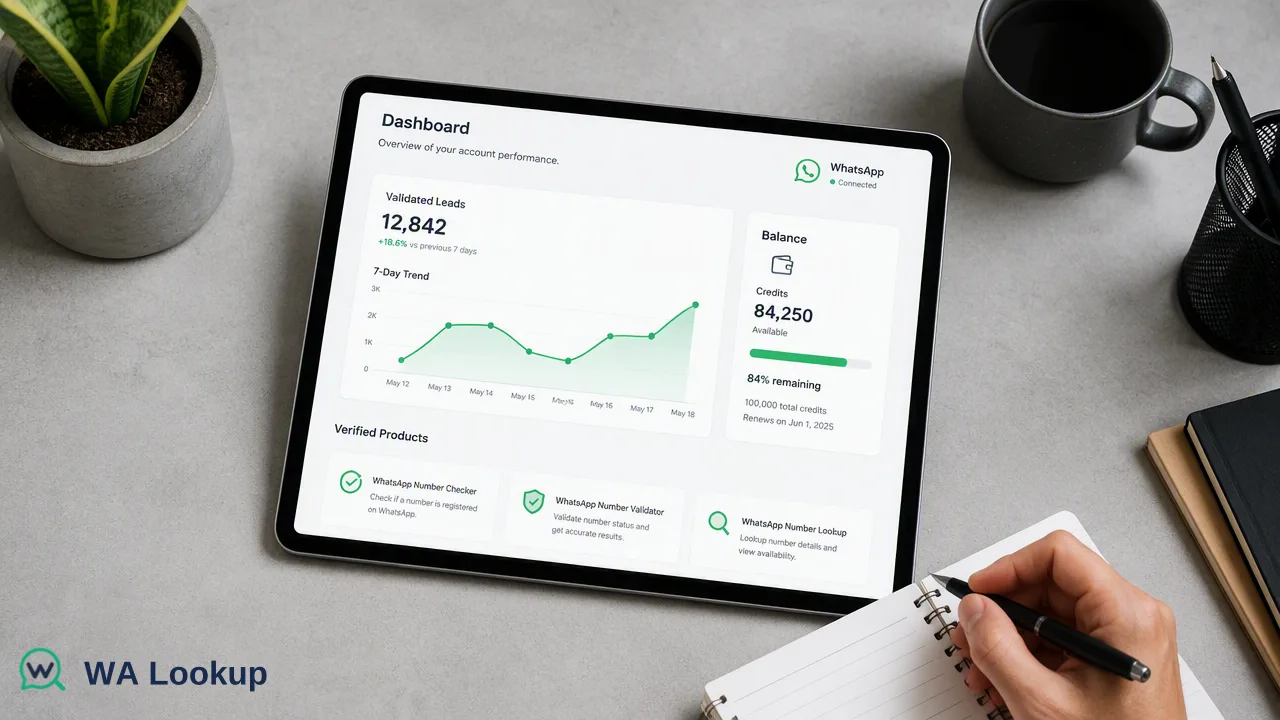
Learn how to integrate the WA Lookup API into B2B lead validation workflows to verify WhatsApp account presence synchronously using E.164 formatted numbers.
The WA Lookup API provides B2B teams with a synchronous WhatsApp number validation API to verify if a phone number is registered on the platform. By submitting an E.164 formatted number to the endpoint, developers receive an immediate account-presence signal in the same HTTP response. This synchronous check supports real-time lead validation workflows, helping marketing operations managers distinguish between standard, business, and avatar-enabled accounts to inform outreach strategies without asynchronous delays.
The Role of WhatsApp Validation in B2B Workflows
B2B lead generation specialists often manage large lists of phone numbers across diverse global markets. Knowing which numbers have an platform account-presence signals presence helps teams prioritize outreach and segment communication channels effectively. A WhatsApp registration status serves strictly as an account-presence signal. It informs internal decisions by confirming the number is registered on the platform at the time of the check. This signal contributes to a cleaner workflow input, ensuring that CRM operators can route leads to the appropriate messaging or calling queues based on platform presence. By integrating these checks early in the lead lifecycle, organizations can better structure their data, update contact records accurately, and support more efficient sales operations.
Understanding Synchronous API Integration
The WA Lookup API is designed around a synchronous request-response pattern. When a system submits a request, the result is returned in the exact same HTTP response, rather than being delivered asynchronously via webhooks or polling mechanisms. This synchronous architecture simplifies integration for developers building real-time validation into web forms, CRM triggers, or data enrichment pipelines.
Because there is no need to build separate webhook listeners or manage delayed callbacks, engineering teams can resolve the state of a phone number immediately. The API uses a standard POST request to the /api/v1/check endpoint, secured via an X-API-Key header. Because the check happens synchronously, the account-presence signal can be immediately consumed by the calling application to route the lead, flag a record for review, or update the database on the fly.
Selecting the Right Service Type
All three WhatsApp products use the same synchronous endpoint. The service_type parameter in the request body controls which specific check is performed, which fields are returned, and which balance cost applies.
- WhatsApp Checker (
ws): Confirms whether a submitted phone number is registered on WhatsApp. The response includes theregisteredfield, providing a baseline account-presence signal. - WhatsApp Avatar Checker (
ws_avatar): Checks WhatsApp registration and adds profile enrichment. It returns anavatarboolean and, when the upstream service supplies one, anavatar_urlstring. This helps teams verify visual profile elements. - WhatsApp Business Checker (
ws_business): Checks registration and determines whether the account uses WhatsApp Business. It returns abusinessboolean, which is particularly useful for B2B workflows aiming to identify other commercial entities. This single-endpoint design allows developers to dynamically adjust the depth of the account-presence signal based on the specific needs of the workflow without changing the core integration.
Technical Implementation Requirements
To successfully query the WhatsApp number validation API, all submitted phone numbers must be formatted according to the E.164 standard. This international telephone numbering plan requires a '+' prefix followed by the country code and the subscriber number.
The documented request contract requires a POST request to /api/v1/check with the headers X-API-Key: <key> and Content-Type: application/json. The JSON body must contain two fields: service_type (accepting ws, ws_avatar, or ws_business) and identifier (containing the E.164 formatted number).
For example, a valid JSON payload would be {"service_type": "ws", "identifier": "+1234567890"}. Every successful check response carries standard fields, including id, identifier, registered, transaction_id, status, service_type, and charged_amount_micros. The inclusion of transaction_id and charged_amount_micros ensures that developers can maintain precise audit logs and track the exact cost of each synchronous check within their internal systems.
Managing Costs and Reliability
WA Lookup operates on a straightforward pay-per-check billing model. To support reliable cost management, the platform enforces an automatic refund policy: any failed or undetermined checks are refunded automatically to the account balance. New accounts can claim a $0.10 trial balance to test registration, avatar, and Business account checks before scaling their integration across larger lead lists. Administrators and marketing operations managers can monitor their usage through the platform dashboard. The dashboard supports API key management, current balance tracking, check history, and product-level reporting. Teams can also review recent checks, monitor balance spend, and analyze 7-day trends. These reporting tools give operations managers the visibility needed to understand how the validation API is being utilized across their B2B workflows and to forecast future usage accurately.
FAQ
What format should phone numbers be in?
All phone numbers must be submitted in the E.164 format. This international standard requires a '+' prefix followed by the country code and the subscriber number (for example, +1234567890).
Are failed checks charged to my account?
No. The API uses a per-check billing model, and any failed or undetermined checks are automatically refunded to your account balance.
What is the difference between the three service types?
The ws service type checks basic WhatsApp registration status. The ws_avatar type checks registration and returns avatar availability along with an avatar URL if supplied. The ws_business type checks registration and indicates if the number is associated with a WhatsApp Business account.
Does the API check if a user is currently online?
No. A registered result strictly reports the WhatsApp status fields available at the time of the check. It serves as an account-presence signal and does not check online status, last seen timestamps, message history, or whether the number can be contacted.